AeroPath 3.0.0
AeroPath has moved well beyond its original beta roadmap. Version 3.0.0 brings the desktop flight companion, Pilot Hub, live maps, flight history, replay, aircraft matching and airport navigation tools together in one connected platform.
The core idea remains simple: load your simulator, prepare the aircraft and fly normally. AeroPath works quietly in the background, detects the flight, records the journey and saves the completed sector automatically.
Version 3.0.0 at a glance
Current release: 3.0.0
The current build combines automatic tracking, route planning, live flight data, SimBrief integration, landing analysis, Pilot Hub and replay in the same desktop application.
Public trial launch
AeroPath is moving to a free-download model with account-based access, a 48-hour desktop trial and a simple £5 monthly subscription for continued use.
Next 3.x updates
Development now focuses on refinement: smoother onboarding, stronger reliability, clearer account access, richer flight data and continued improvements based on real simulator flights.
A complete flight companion, not just a tracker.
AeroPath 3.0.0 covers the full workflow from choosing the next route to reviewing the completed flight. It is designed to stay out of the cockpit while still providing useful planning, navigation and post-flight tools.
Included in AeroPath 3.0.0
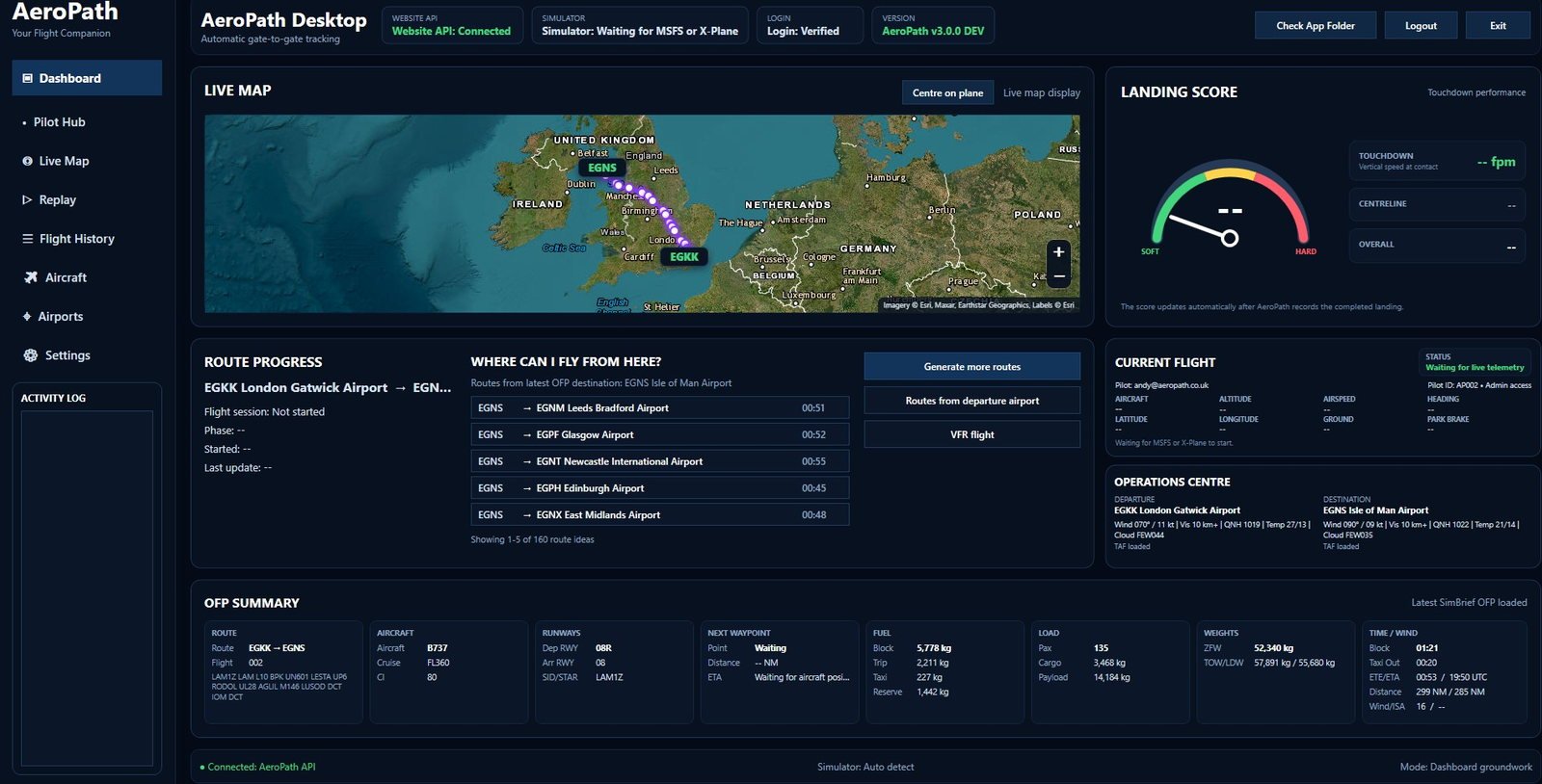
The current AeroPath desktop experience.
Version 3.0.0 brings live maps, automatic tracking, Operations Centre weather, route progress, SimBrief OFP details and landing analysis into one main dashboard.
What comes after 3.0.0?
The next AeroPath updates are about strengthening what is already working rather than resetting the product around an old Version 1.0 plan.
The priority is to make downloading, account creation, trial access, subscription activation and day-to-day simulator use as smooth and reliable as possible.
3.x development focus
Richer pilot statistics
Continue expanding aircraft, airport, route, landing and flight-time statistics as each pilot's AeroPath history grows.
Deeper route planning
Improve route suggestions, briefing information and the connection between the last completed flight and the next sector.
More map intelligence
Refine procedure overlays, airport navigation data, live tracking and replay presentation across both supported simulator platforms.
Community-led improvements
Feedback from content creators, early users and serious simulator pilots will continue shaping each 3.x update.
Broader flying styles
Keep improving support for airline operations, general aviation, VFR, touring, bush flying and other non-airline simulator sessions.
Simple commercial model
Maintain the straightforward AeroPath offer: free download, 48-hour trial and one affordable monthly subscription without feature bolt-ons.
Version 3.0.0 is the starting point for the public AeroPath experience.
AeroPath will continue developing around actual flights, real simulator data and feedback from pilots using the app in MSFS 2020, MSFS 2024 and X-Plane.
One connected flight history.
Plan the route, fly the sector, record the journey, review the landing and replay the flight without forcing a manual ACARS workflow into the cockpit.